Permanent icon record
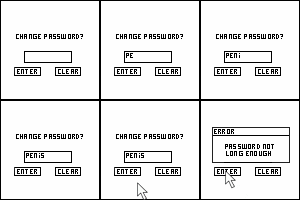
A 4x3 contact sheet of a pixelated animated sequence showing password input changes and an error message on a white background with black text elements.
A 4x3 contact sheet of a pixelated animated sequence showing password input changes and an error message on a white background with black text elements. Animated 100×100 GIF AIM b…
A visual description has not been added yet. The archival record below is still available.
Source & archive date
- Added to archive
- July 7, 2026
Tjshome AIM Buddy Icons
- Source title
- AIM Buddy Icons - The Best Icons for AIM
- Category
- tjshome / buddy icons / Funny
- Era
- Long-Running AIM/Profile Icon Gallery
- Observed
- July 8, 2026 at 04:16 UTC
Tjshome AIM Buddy Icons Portal
- Source title
- AIM Buddy Icons - The Best profile Icons
- Category
- buddyicons / aim buddy icons the best profile icons
- Era
- Late-1990s to Present AIM Portal
- Observed
- July 10, 2026 at 22:15 UTC
Technical archive details
- Format
- GIF
- Dimensions
- 100×100 pixels
- File size
- 1.6 KB
- Motion
- Animated (10 frames)
- Added to archive
- July 7, 2026
- Relative path
- icons/cd/cd71feb103f921fbfcb853921fbf5b629d4bc6926c1780c3e0e96051f90a8b3a.gif
- Media type
- image/gif
- Scanner metadata
- v1
- Animation inspected
- July 10, 2026 at 04:03 UTC
- Archive ID
- cd71feb103f921fb
- SHA-256
- cd71feb103f921fbfcb853921fbf5b629d4bc6926c1780c3e0e96051f90a8b3a
Content-safety assessments (2)
- Assessed
- July 23, 2026 at 06:27 UTC
- Run
- 106
- Input
- image
- Preprocessing
- four-even-frames;flatten-rgb192;stretch-224;triangle;nchw-rgb-u8
- Overall label
- sfw
- Overall score
- 0.085758
OpenAI category scores
- Assessed
- July 10, 2026 at 04:30 UTC
- Run
- 15
- Input
- image
- Preprocessing
- contact-sheet-smart
- Overall label
- questionable
- Overall score
- 0.950000
OpenAI category scores
Enrichment records (1)
A 4x3 contact sheet of a pixelated animated sequence showing password input changes and an error message on a white background with black text elements.
- Reviewed
- July 10, 2026 at 04:30 UTC
- Run
- 15
- Version
- v3
- Elapsed
- 11,248 ms
- Tokens
- prompt 2,966, response 1,182
Review tags
- sequential password entry (action, 1.00)
- 4x3 contact sheet (composition, 1.00)
- penis password (text content, 1.00)
- password interface (subject, 0.95)
- monospaced text (text style, 0.95)
- pixel art interface (style, 0.90)
- error message animation (animation, 0.85)
- cursor pointer animation (animation, 0.80)
Actions
- typing characters into password field
- entering 'PENIS' as password
- displaying error message
Animation
- frame 0: empty input field
- frame 1: 'P' entered
- frame 2: 'PE' entered
- frame 3: 'Pen' entered
- frame 4: 'PENi' entered
- frame 5: 'PENIS' entered
- frame 6: 'PENIS' remains
- frame 7: error message appears with 'PENIS' input
- frame 8: cursor on ENTER button
- frame 9: cursor on ENTER button
Animation Summary
- Sequential animation showing password input progression from empty field to 'PENIS', followed by error message display
Colors
- black
- white
- gray
Composition
- 4x3 grid layout
- uniform frame size
- contact sheet arrangement
Dense Caption
The image displays a 4x3 grid of ten sequential frames from a pixelated animation. Each frame shows a 'CHANGE PASSWORD?' interface with a rectangular input box, two buttons labeled 'ENTER' and 'CLEAR', and a cursor or mouse pointer in some frames. The input box starts empty, then sequentially fills with the characters 'P', 'PE', 'Pen', 'PENi', 'PENIS', and remains as 'PENIS'. In the final frame, an error message appears below the input box stating 'ERROR PASSWORD NOT LONG ENOUGH' while the cursor hovers over 'ENTER'. The interface uses a monospaced font with black text on white background. All frames share identical button layouts and overall design except for changes in the input field content and appearance of the error message. A gray area appears at the bottom right corner of the grid, likely representing transparency or unused space in the contact sheet layout.
Description
A 4x3 contact sheet of a pixelated animated sequence showing password input changes and an error message on a white background with black text elements.
Identity Hypotheses
- PENIS | basis visible | confidence high | evidence 'PENIS' entered as password in multiple frames
Metadata Only Entities
- tjshome-buddyicons
- AIM Buddy Icons - The Best Icons for AIM
Metadata Supported By Image
- category: funny (contextual humor from password entry)
Mood
- neutral
- technical
- humorous (contextual)
Named Entities
- PENIS (password text)
Non Redundant Search Phrases
- AIM buddy icon PENIS password input animation
- pixelated password change sequence with error message
- 4x3 contact sheet of password entry frames
Objects
- input box
- buttons
- error dialog box
Preprocessing Notes
- contact sheet layout 4x3
- sampled frame count 10
- source frame count 10
- gray transparency background at bottom right corner
Safety Notes
- visible explicit text 'PENIS' in password field
Source Metadata Interpretation
source: tjshome-buddyicons | title: AIM Buddy Icons - The Best Icons for AIM | alt: Click icon for more info | category: tjshome / buddy icons / Funny | url: icon(2)_393
Style
- pixel art
- monospaced text
- low-resolution graphics
Subjects
- password input interface
Visible Text
- CHANGE PASSW ORD?
- ENTER
- CLEAR
- P
- PE
- Pen
- PENi
- PENIS
- ERROR
- PASSWORD NOT LONG ENOUGH
Wordwall
- pixelated animation
- 4x3 contact sheet
- CHANGE PASSWORD? interface
- rectangular input box
- ENTER button
- CLEAR button
- monospaced font text
- P character entered
- PE characters entered
- Pen characters entered
- PENi characters entered
- PENIS password
- error message
- ERROR PASSWORD NOT LONG ENOUGH
- cursor pointer
- mouse pointer
- white background
- black text
- sequential frame changes
- input field content change
- button layout consistency
- pixelated interface design
Raw JSON
{
"inputIndex": 0,
"sha256": "cd71feb103f921fbfcb853921fbf5b629d4bc6926c1780c3e0e96051f90a8b3a",
"description": "A 4x3 contact sheet of a pixelated animated sequence showing password input changes and an error message on a white background with black text elements.",
"denseCaption": "The image displays a 4x3 grid of ten sequential frames from a pixelated animation. Each frame shows a \u0027CHANGE PASSWORD?\u0027 interface with a rectangular input box, two buttons labeled \u0027ENTER\u0027 and \u0027CLEAR\u0027, and a cursor or mouse pointer in some frames. The input box starts empty, then sequentially fills with the characters \u0027P\u0027, \u0027PE\u0027, \u0027Pen\u0027, \u0027PENi\u0027, \u0027PENIS\u0027, and remains as \u0027PENIS\u0027. In the final frame, an error message appears below the input box stating \u0027ERROR PASSWORD NOT LONG ENOUGH\u0027 while the cursor hovers over \u0027ENTER\u0027. The interface uses a monospaced font with black text on white background. All frames share identical button layouts and overall design except for changes in the input field content and appearance of the error message. A gray area appears at the bottom right corner of the grid, likely representing transparency or unused space in the contact sheet layout.",
"wordwall": [
"pixelated animation",
"4x3 contact sheet",
"CHANGE PASSWORD? interface",
"rectangular input box",
"ENTER button",
"CLEAR button",
"monospaced font text",
"P character entered",
"PE characters entered",
"Pen characters entered",
"PENi characters entered",
"PENIS password",
"error message",
"ERROR PASSWORD NOT LONG ENOUGH",
"cursor pointer",
"mouse pointer",
"white background",
"black text",
"sequential frame changes",
"input field content change",
"button layout consistency",
"pixelated interface design"
],
"visibleText": [
"CHANGE PASSW ORD?",
"ENTER",
"CLEAR",
"P",
"PE",
"Pen",
"PENi",
"PENIS",
"ERROR",
"PASSWORD NOT LONG ENOUGH"
],
"uncertainText": [],
"subjects": [
"password input interface"
],
"actions": [
"typing characters into password field",
"entering \u0027PENIS\u0027 as password",
"displaying error message"
],
"objects": [
"input box",
"buttons",
"error dialog box"
],
"colors": [
"black",
"white",
"gray"
],
"style": [
"pixel art",
"monospaced text",
"low-resolution graphics"
],
"composition": [
"4x3 grid layout",
"uniform frame size",
"contact sheet arrangement"
],
"mood": [
"neutral",
"technical",
"humorous (contextual)"
],
"animation": [
"frame 0: empty input field",
"frame 1: \u0027P\u0027 entered",
"frame 2: \u0027PE\u0027 entered",
"frame 3: \u0027Pen\u0027 entered",
"frame 4: \u0027PENi\u0027 entered",
"frame 5: \u0027PENIS\u0027 entered",
"frame 6: \u0027PENIS\u0027 remains",
"frame 7: error message appears with \u0027PENIS\u0027 input",
"frame 8: cursor on ENTER button",
"frame 9: cursor on ENTER button"
],
"preprocessingNotes": [
"contact sheet layout 4x3",
"sampled frame count 10",
"source frame count 10",
"gray transparency background at bottom right corner"
],
"sourceMetadataInterpretation": [
"source: tjshome-buddyicons | title: AIM Buddy Icons - The Best Icons for AIM | alt: Click icon for more info | category: tjshome / buddy icons / Funny | url: icon(2)_393"
],
"metadataSupportedByImage": [
"category: funny (contextual humor from password entry)"
],
"metadataNotConfirmedByImage": [],
"metadataContradictedByImage": [],
"visuallySupportedEntities": [],
"metadataOnlyEntities": [
"tjshome-buddyicons",
"AIM Buddy Icons - The Best Icons for AIM"
],
"identityHypotheses": [
"PENIS | basis visible | confidence high | evidence \u0027PENIS\u0027 entered as password in multiple frames"
],
"namedEntities": [
"PENIS (password text)"
],
"fandoms": [],
"animationSummary": "Sequential animation showing password input progression from empty field to \u0027PENIS\u0027, followed by error message display",
"safetyLabel": "questionable",
"safetyConfidence": 0.95,
"isNsfw": false,
"needsManualReview": true,
"nsfwReasons": [],
"safetyNotes": [
"visible explicit text \u0027PENIS\u0027 in password field"
],
"nonRedundantSearchPhrases": [
"AIM buddy icon PENIS password input animation",
"pixelated password change sequence with error message",
"4x3 contact sheet of password entry frames"
],
"uncertainty": [],
"aestheticStrengths": [],
"aestheticWeaknesses": [],
"tags": [
{
"tag": "password interface",
"category": "subject",
"confidence": 0.95,
"evidence": "visible \u0027CHANGE PASSWORD?\u0027 text and input box"
},
{
"tag": "PENIS password",
"category": "text content",
"confidence": 1.0,
"evidence": "\u0027PENIS\u0027 entered in multiple frames"
},
{
"tag": "error message animation",
"category": "animation",
"confidence": 0.85,
"evidence": "ERROR PASSWORD NOT LONG ENOUGH appears in final frame"
},
{
"tag": "pixel art interface",
"category": "style",
"confidence": 0.9,
"evidence": "low-resolution monospaced graphics"
},
{
"tag": "4x3 contact sheet",
"category": "composition",
"confidence": 1.0,
"evidence": "grid layout of 10 frames arranged 4 columns by 3 rows"
},
{
"tag": "monospaced text",
"category": "text style",
"confidence": 0.95,
"evidence": "uniform character spacing in input field and buttons"
},
{
"tag": "cursor pointer animation",
"category": "animation",
"confidence": 0.8,
"evidence": "mouse cursor visible on ENTER button in final frames"
},
{
"tag": "sequential password entry",
"category": "action",
"confidence": 1.0,
"evidence": "progressive text changes from \u0027P\u0027 to \u0027PENIS\u0027 across frames"
}
],
"moderationAudit": {
"storedSafetyLabel": "questionable",
"storedIsNsfw": false,
"storedNeedsManualReview": true,
"hardAdultTextOverride": false,
"missingSafetyLabel": false
}
}Source semantic tags (11)
Full source records (2)
Tjshome AIM Buddy Icons (tjshome-buddyicons)
- Kind
- static-gallery
- Era
- Long-Running AIM/Profile Icon Gallery
- Type
- live category gallery
- Category
- tjshome / buddy icons / Funny
- Title
- AIM Buddy Icons - The Best Icons for AIM
- Alt
- Click icon for more info
- Observed
- July 8, 2026 at 04:16 UTC
- Rights
- mixed user-submitted material; research/reference only by default
- Slice
- general user-submitted AIM/profile icon categories
Original: http://tjshome.com/images/buddyicons/icon(2)_393.gif Download: http://tjshome.com/images/buddyicons/icon(2)_393.gif Page: http://tjshome.com/buddyiconsel.php?id=1188&s=b
Tjshome AIM Buddy Icons Portal (tjshome-aim-buddy-icons-portal)
- Kind
- static-gallery
- Era
- Late-1990s to Present AIM Portal
- Type
- live categorized AIM buddy-icon portal
- Category
- buddyicons / aim buddy icons the best profile icons
- Title
- AIM Buddy Icons - The Best profile Icons
- Alt
- Click icon for more info
- Observed
- July 10, 2026 at 22:15 UTC
- Rights
- mixed user-submitted and third-party imagery; research/reference only by default
- Slice
- long-running user-submitted AIM identity graphics spanning anime, animals, cartoons, computers, dolls, emotions, holidays, love, people, politics, sayings, and television/film
Original: http://tjshome.com/images/buddyicons/icon(2)_393.gif Download: http://tjshome.com/images/buddyicons/icon(2)_393.gif Page: http://tjshome.com/buddyiconsel.php?id=1188&s=b